Overview
A set in Python represents the mathematical concept of sets. Python provides two types of set implementations: A set and a frozenset. Sets are mutable sequences. A value can be added to a set containing the values {"Red", "Green"} and the set grows into {"Red", "Green", "Blue"}.
The frozenset is also a set, however a frozenset is immutable. Once a frozenset is created, new elements cannot be added to it. A frozenset with value {128, 150, 175} once created, cannot be added with new elements. The elements of a frozenset object cannot change their values.
Hashable Property of frozenset
A frozenset is hashable, meaning every time a frozenset instance is hashed, the same hash value is returned. The hashable property of the frozenset makes it qualified to be a key in a Python dictionary. The hashable property of the frozenset also makes two frozenset objects to be compared for equality.
Creating frozenset objects in Python
The constructor of a frozenset takes an iterable object and returns a frozenset instance. In case if no iterable object is passed, the constructor returns an empty frozenset. In both the cases the returned frozenset is immutable.
Applications of frozensets
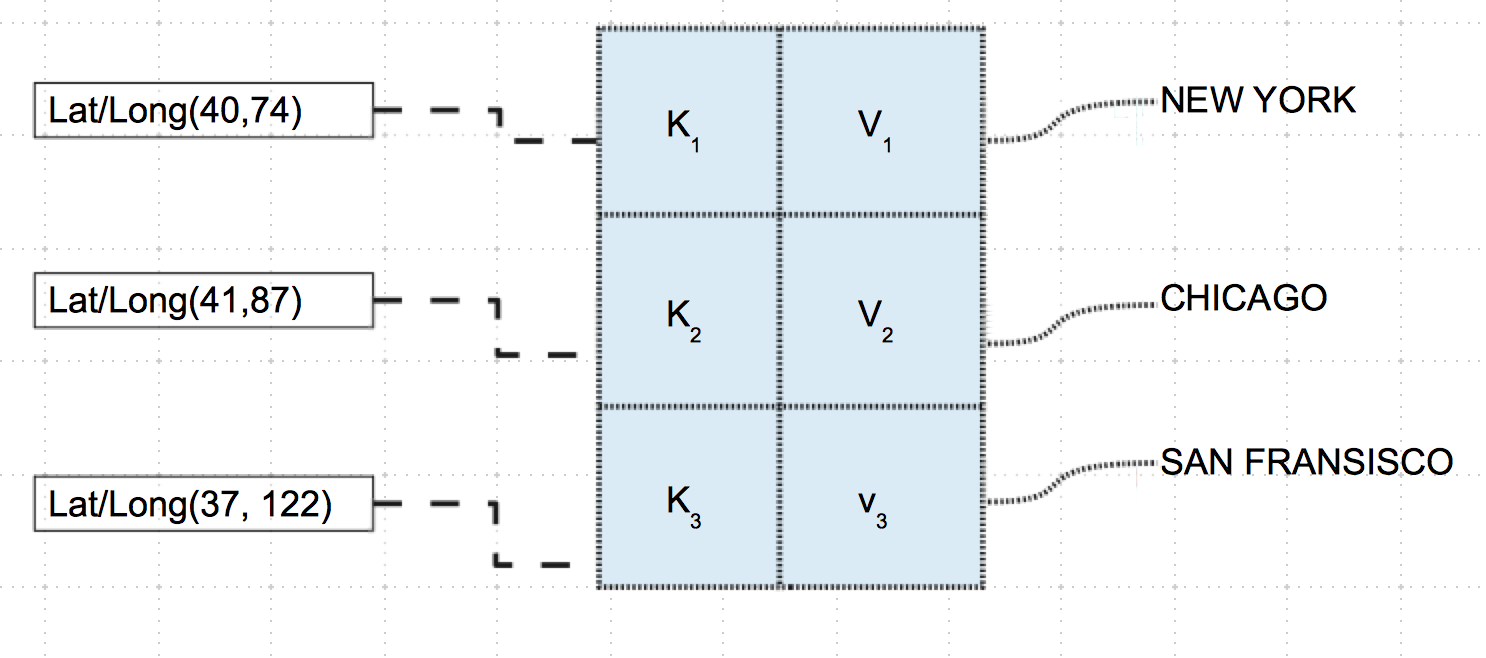
Applications of frozensets include set of sets and dictionaries where the keys are required to be pairs or triples.
Frozenset operations
Since frozenset objects are immutable, the following set methods are not supported by frozenset: update(), intersection_update(), symmetric_difference_update() ,add(), remove(), discard(), pop(), clear(). The following set operators are also not allowed on a frozenset object: |=, &=, -=, ^=.
Example 1
# Sample Python program for frozenset

singleDigitPrimes   = (2,3,5,7)

# Single digit prime numbers as a Python frozenset

singleDigitPrimeSet = frozenset(singleDigitPrimes)

# Prime numbers less than ten as a Python frozenset

primeLTTen          = frozenset((2,3,5,7))

# Prime numbers less than twenty as a Python frozenset

primeLTTwenty       = frozenset((2,3,5,7,11,13,17,19))

# Check the single digit prime number set

# and the prime number set less than ten are same

print("Single digit prime number set is equal to prime number set of numbers less than the integer ten:%s"%(primeLTTen == singleDigitPrimeSet))

# Check the single digit prime number set

# and the prime number set less than twenty are same

print("Single digit prime number set is equal to prime number set of numbers less than the integer twenty:%s"%(primeLTTwenty == singleDigitPrimeSet))

# Are the prime numbers less than ten and the prime numbers less than twenty are disjoint

print("Prime numbers less than ten and the prime numbers less than twenty are disjoint:%s"%(primeLTTen.isdisjoint(primeLTTwenty)))
Output
Single digit prime number set is equal to prime number set of numbers less than the integer ten:True

Single digit prime number set is equal to prime number set of numbers less than the integer twenty:False

Prime numbers less than ten and the prime numbers less than twenty are disjoint:False
Example 2
This example Python program shows how a frozenset can be used along with a Python dictionary instance. A set of latitude and longitude values are added as keys of a dictionary instance. The values against the keys are the strings of city names while they could be any complex object. This is possible as the frozenset instances are immutable and hashable.
# Example Python program using frozenset as keys of a dictionary

# City1

latitude1 = 40

longitude1     = 74

latLong1 = (latitude1, longitude1)

cityName1 = "NewYork"

# City2

latitude2 = 41

longitude2     = 87

latLong2 = (latitude2, longitude2)

cityName2 = "Chicago"

# City3

latitude3 = 37

longitude3     = 122

latLong3 = (latitude3, longitude3)

cityName3 = "San Francisco"

# Create a Python dictionary

cityCollection = dict()

# With key as a frozenset instance of latitude and longitude

# add cities to the dictionary

cityCollection[latLong1] = cityName1

cityCollection[latLong2] = cityName2

cityCollection[latLong3] = cityName3

# Print the dictionary

print("Cities by latitude and longitude:")

print(cityCollection)
Output
Cities by latitude and longitude:

{(40, 74): 'NewYork', (41, 87): 'Chicago', (37, 122): 'San Francisco'}