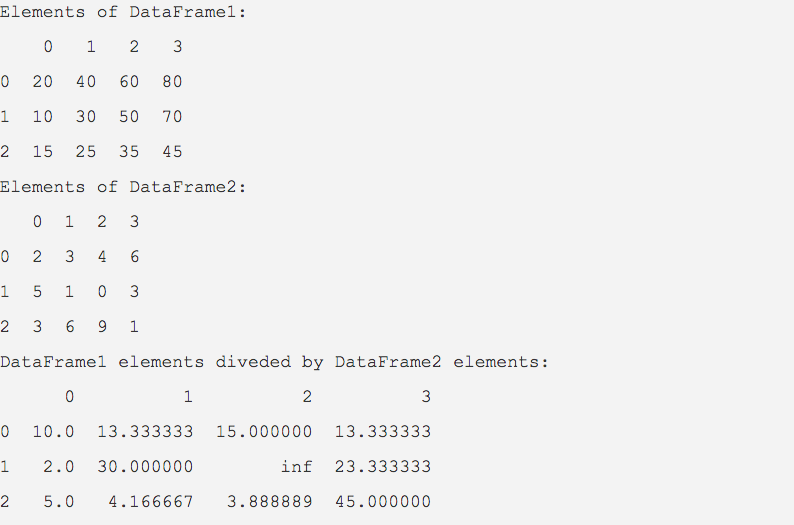
div() function of the DataFrame class of pandas library, allows elements of a DataFrame to be divided by another DataFrame or by a Python Sequence. The pandas example divides elements of one dataframe by elements of another dataframe and prints the results to the console.
div() method divides element-wise division of one pandas DataFrame by another.
DataFrame elements can be divided by a pandas series or by a Python sequence as well.
Calling div() on a DataFrame instance is equivalent to invoking the division operator (/).
The div() method provides the fill_value parameter which is used for replacing the np.nan and None values present in the DataFrame or in the resultant value with any other value.
Example
python
import pandas as pd

# Data creation part

data1 = [(20, 40, 60, 80),

         (10, 30, 50, 70),

         (15, 25, 35, 45)];

data2 = [(2, 3, 4, 6),

         (5, 1, 0, 3),

         (3, 6, 9, 1)];

# Creation of pandas DataFrames

dataFrame1 = pd.DataFrame(data=data1);

dataFrame2 = pd.DataFrame(data=data2);

# Divide the DataFrame1 elements by the elements of DataFrame2

divisionResults = dataFrame1.div(dataFrame2);

print("Elements of DataFrame1:")

print(dataFrame1);

print("Elements of DataFrame2:")

print(dataFrame2);

print("DataFrame1 elements divided by DataFrame2 elements:")

print(divisionResults);
Output
Your privacy choices
We'd like to use Google Analytics cookies to count visits and see which tutorials are useful.
They are only set if you accept. We don't use advertising cookies and we don't sell your data.
You can change your choice any time from “Your privacy choices” at the bottom of every page.
Privacy Policy
Your privacy choices
Your browser sent a Global Privacy Control signal, so analytics is off unless you turn it on here.
Strictly necessary
Remembers this choice in your browser. No cookies, nothing sent to anyone.Always on