Overview
- Pandas DataFrame class supports storing data in two-dimensional format using nump.ndarray as the underlying data-structure.
- The DataFrame contents can be written to a disk file, to a text buffer through the method DataFrame.to_csv(), by passing the name of the CSV file or the text stream instance as a parameter.
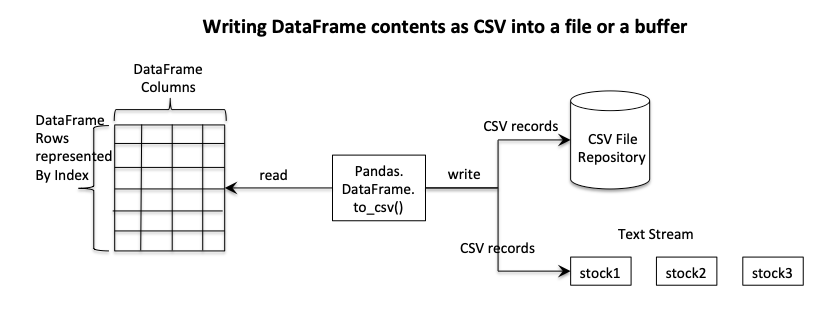
Example - To write the contents of a pandas DataFrame as a CSV file
The Python example below writes the contents of a DataFrame which has volume data of three stocks for five trading days into a CSV file in the current working directory.
# Example Python program to write the contents of a

# DataFrame into a CSV file

import pandas as pds

# Name of the CSV file

csvFileName = "./Volumes.csv"

# Create a dictionary of lists for stock vs volume data

volumes = {"Stock1":[53871, 48421, 51761, 57987, 58900],

           "Stock2":[45012, 44521, 45569, 44732, 44721],

           "Stock3":[67540, 62890, 66743, 68900, 71456]};

# Load data into a DataFrame instance

dataFrame = pds.DataFrame(data=volumes);

dataFrame.index = ("Day 1", "Day 2", "Day 3", "Day 4", "Day 5");

# Write contents of the DataFrame to a CSV file

dataFrame.to_csv(csvFileName);
Output
Contents of the CSV file Volumes.csv as written by the above example is given here.
,Stock1,Stock2,Stock3

Day 1,53871,45012,67540

Day 2,48421,44521,62890

Day 3,51761,45569,66743

Day 4,57987,44732,68900

Day 5,58900,44721,71456
Example - To get the contents of a pandas DataFrame as a CSV String
This Python example program creates a DataFrame from a Python dictionary and gets the DataFrame contents as a CSV string by calling DataFrame.to_csv() method, without passing any parameters.
# Example Python program to get the contents of a DataFrame as a CSV string

import pandas as pds

# Standard deviations in the thickness of three wooden board variants in mm

standardDeviations = {"Wood 1": [0.4, 0.5, 0.3],

                      "Wood 2": [0.1, 0.2, 0.3],

                      "Wood 3": [0.7, 0.6, 0.7]

                      };

# Load data into a DataFrame instance

dataFrame = pds.DataFrame(data=standardDeviations, index=("Variant1",

                                                          "Variant2",

                                                          "Variant3"));

# Get the contents of the DataFrame as a CSV file

csv=dataFrame.to_csv();

print("Contents of the DataFrame as a CSV string:")

print(csv);
Output
Contents of the DataFrame as a CSV string:

,Wood 1,Wood 2,Wood 3

Variant1,0.4,0.1,0.7

Variant2,0.5,0.2,0.6

Variant3,0.3,0.3,0.7
Example - To write a pandas DataFrame into a text buffer
This Python example passes an instance of a text stream like StringIO() to write the DataFrame as a CSV into the in-memory text buffer.
# Example Python program to write the contents of a DataFrame to a buffer

import pandas as pds

from io import StringIO

# Closing price of 3 different stocks over 5 trading days

closingPrices = {"Stock1": [34.17, 34.25, 34.2, 34.24, 34.3],

                "Stock2": [10.01, 10.20, 10.1, 10.15, 10.2],

                "Stock3": [41.6, 42.1, 41.89, 42.4, 42.7]

               };

# Load data from the Python dictionary into a DataFrame instance

dataFrame = pds.DataFrame(data=closingPrices);

# Create an in-memory text stream

textStream = StringIO();

# Write the DataFrame contents to the text stream's buffer as a CSV

dataFrame.to_csv(textStream);

print("DataFrame as CSV (from the buffer):");

# Print the buffer contents

print(textStream.getvalue());
Output
DataFrame as CSV (from the buffer):

,Stock1,Stock2,Stock3

0,34.17,10.01,41.6

1,34.25,10.2,42.1

2,34.2,10.1,41.89

3,34.24,10.15,42.4

4,34.3,10.2,42.7