Overview
- The contents of a pandas.Series instance can be transformed based on a mathematical function.
- By calling Series.apply() method and passing either a Python function or a numpy universal function(ufunc) as the value for func parameter, the values present in the series are transformed by the applied/passed-in function.
- The Series.trasnform() method is more versatile through accepting a function name, a list of function names, or a function that works with Series.Apply().
Example - Using Series.apply()
- The example Python code reads a CSV file (antennas.csv) and loads the columns into a DataFrame.
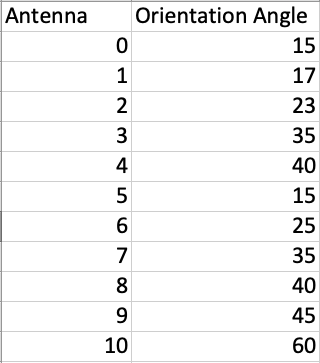
- The column containing the orientation angles is selected into a Series and **apply()**is called by passing the math.cos() function as the parameter. This returns a new pandas.Series with cosine values of the orientation angles.
# Example Python program to transform the values

# of a pandas.series instance by applying a function

import pandas as pds

import math

# Load the data from the cake.csv

dataFile = "./Antennas.csv";

df       = pds.read_csv(dataFile);

series   = df["Orientation Angle"];

cosineValues = series.apply(math.cos);

print(cosineValues);
Output
0    -0.759688

1    -0.275163

2    -0.532833

3    -0.903692

4    -0.666938

5    -0.759688

6     0.991203

7    -0.903692

8    -0.666938

9     0.525322

10   -0.952413

Name: Orientation Angle, dtype: float64
Example - Using Series.transform()
When more than one function is passed to transform() the result is a pandas.DataFrame whose columns are produced by the functions passed in.
# Example Python program to transform the values

# of a pandas.series instance by applying multiple

# functions

import pandas as pds

import math

def radius_squared(radius):

    return math.pow(radius, 2);

def radius_cubed(radius):

    return math.pow(radius, 2);

# Radius of the antennas in meters

radius_Vals     = (5, 5.5, 7, 7.5, 9);

series   = pds.Series(radius_Vals);

radiusTakenToPower = series.transform([radius_squared, radius_cubed]);

print(radiusTakenToPower);

print(type(radiusTakenToPower));
Output
  radius_squared  radius_cubed

0           25.00         25.00

1           30.25         30.25

2           49.00         49.00

3           56.25         56.25

4           81.00         81.00

<class 'pandas.core.frame.DataFrame'>